Topic: this ever happen to u
+Anonymous A — 9.9 years ago #45,764
you have bookmark on your bookmark bar and its to sth that mattered to u at the time you decided to bookmark it like some youtube video and now to get to youtube u just middle click that bookmark and then click the youtube icon to get to the homepage yet the video is still playing but youre on the homepage but you've so many other tabs opened to other shit now you're searching for where this audio coming from checking task manager for running shit or some shit and then restart computer. why does that happen?
+FuckAlms !vX8K53rFBI — 9.9 years ago, 1 hour later[T] [B] #499,024
yt;dw prevents this problem
+Syntax — 9.9 years ago, 1 day later, 1 day after the original post[T] [B] #499,048
 What browser are you using?
I am trying to get work done as I played hooky for a party to watch the debate and life will not be worth living tomorrow IF I fail to get stuff done on paper so a huge group can crank out a mass of stuff quickly in a lab in early AM
In both Firefox n Chrome any tab that has live audio has this symbol in the icon and you can right click the tab and mute the tab
Just tested this in Edge and same Icon on tab
·Anonymous A (OP) — 9.9 years ago, 2 hours later, 1 day after the original post[T] [B] #499,052
@previous (Syntax)
chrome. its happened a couple of times. im staring at the homepage and the audio from the video i bookmarked is playing
chrome. its happened a couple of times. im staring at the homepage and the audio from the video i bookmarked is playing
·Syntax — 9.9 years ago, 1 hour later, 1 day after the original post[T] [B] #499,054
 @previous (A)
So perhaps given you are telling me there is no audio icon on the tab - but there is audio on that home page
So much I do not know about HTML current versions. I do sit in on lectures and even take classes and then the test but then one year later a new standard
So perhaps the home page is rendered in a prior version of HTML and embedded audio from say a flash or youtube file is playing yet it does not show up in icon?
Task manager is not the tool to find audio in a tab - Its so SO Late and I now have much Makers Mark and a Salami on Rye and broke a new jar of mustard on the kitchen floor what a mess - There is a far more detailed tool you have to view what is going on
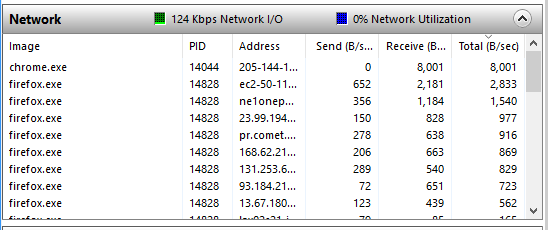
AH Found it - IF and that is IF you are using Win something? and its modern? Hit Start and enter perfmon
Performance Monitor is a very cool tool - You can see each of your tabs and
Screen shot and you can see I have PBS radio streaming and you can see each IP address so it should be easy with lots of tabs open to find the offender quickly - takes a little experience to quickly translate URL address to a real IP but you can do that quickly and now its bed time so I can get in Surf time early AM pre sunrise
(Edited 1 minute later.)
+cluxgle !IcIcDBDKAM — 9.9 years ago, 4 minutes later, 1 day after the original post[T] [B] #499,055
Right click the tab you dildo
·Syntax — 9.9 years ago, 11 hours later, 2 days after the original post[T] [B] #499,063
@previous (cluxgle !IcIcDBDKAM)
You Dildo for not ceeing this
> and you can right click the tab and mute the tab
Betting he has audio but does not have the audio icon in view
Performance Monitor will find the tabs with audio or video or both - Flash streams you name it show up as Bits/Sec so its easy to have 10 browsers on on PC and find the one of 150 tabs that has Stuff you need to kill
You Dildo for not ceeing this
> and you can right click the tab and mute the tab
Betting he has audio but does not have the audio icon in view
Performance Monitor will find the tabs with audio or video or both - Flash streams you name it show up as Bits/Sec so its easy to have 10 browsers on on PC and find the one of 150 tabs that has Stuff you need to kill
·Anonymous A (OP) — 9.9 years ago, 8 hours later, 2 days after the original post[T] [B] #499,073
P.S. Nigress
(Edited 1 minute later.)
Start a new topic to continue this conversation.
Or browse the latest topics.