Topic: Ok nerds, what am I not seeing here?
+FuckAlms !vX8K53rFBI — 12.2 years ago #35,903
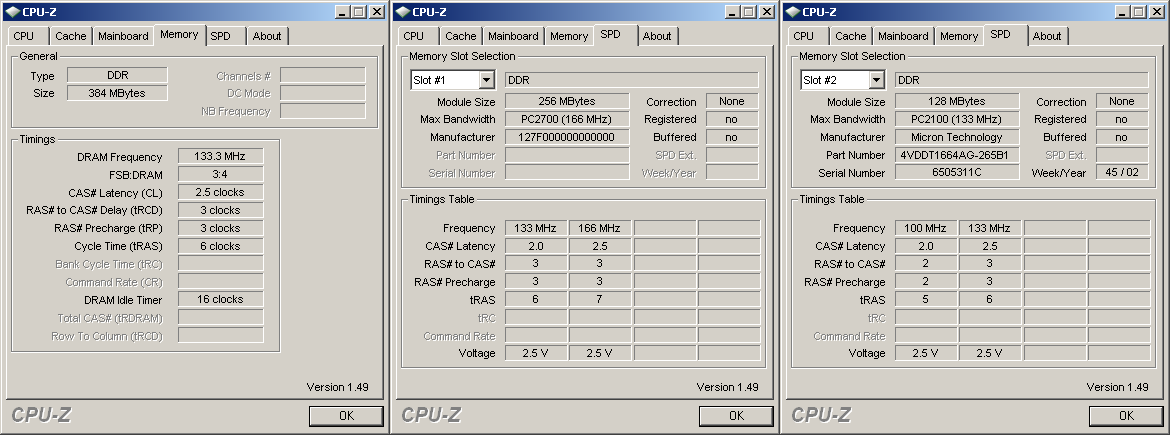 Trying to get some more RAM into my XP desktop, but I get errors when I try to insert any of the
 As far as I can tell, all the specs are in compliance with the current RAM. (See left.)
·FuckAlms !vX8K53rFBI (OP) — 12.2 years ago, 4 minutes later[T] [B] #406,705
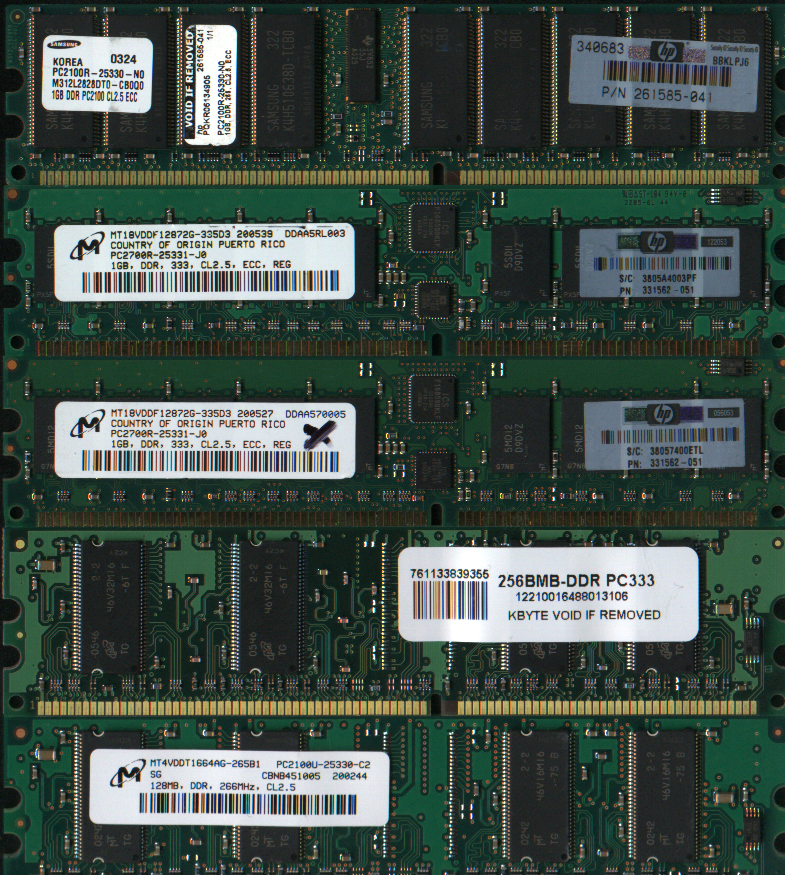 Yet, for whatever reason, the three 1GB sticks on top prevent the computer from showing any sort of on-screen output. Just 3 beeps to let me know something isn't happy. The two sticks on the bottom work normally.
+Syntax — 12.2 years ago, 8 minutes later, 13 minutes after the original post[T] [B] #406,710
> The two sticks on the bottom work normally.
First step - Pull out one of the bottom sticks so you only have one stick in TOTAL - Run computer Then
2nd step - Put in any one of the other three and test to see that computer accepts them as ok
Check out all three one at a tyme.
First step - Pull out one of the bottom sticks so you only have one stick in TOTAL - Run computer Then
2nd step - Put in any one of the other three and test to see that computer accepts them as ok
Check out all three one at a tyme.
·FuckAlms !vX8K53rFBI (OP) — 12.2 years ago, 4 minutes later, 17 minutes after the original post[T] [B] #406,712
@previous (Syntax )
Already did that. I know better than to ask tinychan as anything other than a last resort.
Already did that. I know better than to ask tinychan as anything other than a last resort.
+Anonymous C — 12.2 years ago, 3 minutes later, 20 minutes after the original post[T] [B] #406,713
Have you sacrificed a calculator or old mobile phone first to appease your motherboard?
·Syntax — 12.2 years ago, 55 seconds later, 21 minutes after the original post[T] [B] #406,714
@406,712 (FuckAlms !vX8K53rFBI)
So you have verified that all 3 sticks are good.
I suppose you next and with only ONE known good stick Stick - tested it in one of the three other slots?
Or in better English you with just one working stick put it in one of the top 3 slots?
So you have verified that all 3 sticks are good.
I suppose you next and with only ONE known good stick Stick - tested it in one of the three other slots?
Or in better English you with just one working stick put it in one of the top 3 slots?
+Morbid !vbsvhaneDY — 12.2 years ago, 1 minute later, 23 minutes after the original post[T] [B] #406,715
·Syntax — 12.2 years ago, 8 minutes later, 31 minutes after the original post[T] [B] #406,718
@previous (Morbid !vbsvhaneDY)
I could ask him if his XP is 32 or 64bit version. If its 32bit I think that limit was 4Gigs of RAM but as I remember adding more did not stop computer from booting up. I tried that on IBM Think pad with out a glitch - just got no improvement -
I could ask him if his XP is 32 or 64bit version. If its 32bit I think that limit was 4Gigs of RAM but as I remember adding more did not stop computer from booting up. I tried that on IBM Think pad with out a glitch - just got no improvement -
·FuckAlms !vX8K53rFBI (OP) — 12.2 years ago, 17 minutes later, 48 minutes after the original post[T] [B] #406,720
@406,714 (Syntax )
It's a negative test, if any of the 3 sticks are in the machine, it refuses to boot; regardless of whether one of the working sticks is also in it. Also, the 2 bottom sticks work, for a total of 384MB RAM. I'm trying to replace those 2 with higher quantity sticks because 384MB for XP, while functional, is severely limited. My old XP box had 512MB, but it used DIMMs instead of DDR. The mobo only has 2 slots, so exceeding the RAM limit with 1GB sticks isn't possible, but yes it's 32bit XP Home edition.
@406,713 (C)
I sacrificed an old monitor, does that count?
It's a negative test, if any of the 3 sticks are in the machine, it refuses to boot; regardless of whether one of the working sticks is also in it. Also, the 2 bottom sticks work, for a total of 384MB RAM. I'm trying to replace those 2 with higher quantity sticks because 384MB for XP, while functional, is severely limited. My old XP box had 512MB, but it used DIMMs instead of DDR. The mobo only has 2 slots, so exceeding the RAM limit with 1GB sticks isn't possible, but yes it's 32bit XP Home edition.
@406,713 (C)
I sacrificed an old monitor, does that count?
·Syntax — 12.2 years ago, 25 minutes later, 1 hour after the original post[T] [B] #406,729
@previous (FuckAlms !vX8K53rFBI)
I read your reply over 3 tymes and go er hey wait a minute
What I need to ask again is - You said
> if any of the 3 sticks are in the machine, it refuses to boot;
AND that is when any one of those sticks is placed into one of those open slots RIGHT
So of course you pulled out all of the RAM sticks and put One just One known good working stick into One of those slots to verify that the Mother board PC connections are A-OK in each of those positions one at a tyme?
AND OR You pulled out all the Sticks - And put in One of the Brand New sticks in to replace the former working Stick?
Just checking two separate items one at a tyme
1: That any one of the new Sticks work in your Mother board and at the moment the best way to find out is to pull out everything and substitute One New for One working Old
If that test tells you that a New Stick fails to allow Computer to Boot you know you have New Sticks that for whatever reason are not accepted by your machine.
2: Other steps wood verify if something is wrong with those other three slots - a working stick in one of those slots wood clear up that simple question.
I am placing bets that for whatever reason Your New Sticks are suspect. Unless One does replace an old Stick!
I read your reply over 3 tymes and go er hey wait a minute
What I need to ask again is - You said
> if any of the 3 sticks are in the machine, it refuses to boot;
AND that is when any one of those sticks is placed into one of those open slots RIGHT
So of course you pulled out all of the RAM sticks and put One just One known good working stick into One of those slots to verify that the Mother board PC connections are A-OK in each of those positions one at a tyme?
AND OR You pulled out all the Sticks - And put in One of the Brand New sticks in to replace the former working Stick?
Just checking two separate items one at a tyme
1: That any one of the new Sticks work in your Mother board and at the moment the best way to find out is to pull out everything and substitute One New for One working Old
If that test tells you that a New Stick fails to allow Computer to Boot you know you have New Sticks that for whatever reason are not accepted by your machine.
2: Other steps wood verify if something is wrong with those other three slots - a working stick in one of those slots wood clear up that simple question.
I am placing bets that for whatever reason Your New Sticks are suspect. Unless One does replace an old Stick!
+Anonymous E — 12.2 years ago, 1 minute later, 1 hour after the original post[T] [B] #406,731
@406,720 (FuckAlms !vX8K53rFBI)
> It's a negative test, if any of the 3 sticks are in the machine, it refuses to boot; regardless of whether one of the working sticks is also in it. Also, the 2 bottom sticks work, for a total of 384MB RAM. I'm trying to replace those 2 with higher quantity sticks because 384MB for XP, while functional, is severely limited. My old XP box had 512MB, but it used DIMMs instead of DDR. The mobo only has 2 slots, so exceeding the RAM limit with 1GB sticks isn't possible, but yes it's 32bit XP Home edition.
I swear this is a serious question - have you ever kissed a girl?
> It's a negative test, if any of the 3 sticks are in the machine, it refuses to boot; regardless of whether one of the working sticks is also in it. Also, the 2 bottom sticks work, for a total of 384MB RAM. I'm trying to replace those 2 with higher quantity sticks because 384MB for XP, while functional, is severely limited. My old XP box had 512MB, but it used DIMMs instead of DDR. The mobo only has 2 slots, so exceeding the RAM limit with 1GB sticks isn't possible, but yes it's 32bit XP Home edition.
I swear this is a serious question - have you ever kissed a girl?
·Morbid !vbsvhaneDY — 12.2 years ago, 13 minutes later, 1 hour after the original post[T] [B] #406,743
+Anonymous F — 12.2 years ago, 7 minutes later, 1 hour after the original post[T] [B] #406,748
@OP
Buy a new computer.
Buy a new computer.
+The Doctor !7MHPahvoGY — 12.2 years ago, 55 seconds later, 1 hour after the original post[T] [B] #406,749

·Morbid !vbsvhaneDY — 12.2 years ago, 56 minutes later, 2 hours after the original post[T] [B] #406,752
+Anonymous H — 12.2 years ago, 39 minutes later, 3 hours after the original post[T] [B] #406,760
 Fuckalms is a girl? I've been masturbating to a girl?
·Jermaine — 12.2 years ago, 1 minute later, 3 hours after the original post[T] [B] #406,761
@406,749 (The Doctor !7MHPahvoGY)
> FuckAlms is a man. I can confirm this.
Yeah, we know you can, Mark. We know you can.
> FuckAlms is a man. I can confirm this.
Yeah, we know you can, Mark. We know you can.
·The Doctor !7MHPahvoGY — 12.2 years ago, 15 minutes later, 3 hours after the original post[T] [B] #406,764

+kook !!u4KQvs2JM — 12.2 years ago, 15 minutes later, 3 hours after the original post[T] [B] #406,765
+tommy toughstuff !ogS6LtyaLs — 12.2 years ago, 49 minutes later, 4 hours after the original post[T] [B] #406,787
either use a higher bit operating system or check the compatibility with your ram/motherboard
most likely the latter, upgrade to either 512mb sticks or 1gb sticks depending on what your motherboard allows, shithead.
edit: ive just read the op more in depth and i am now going to say that it is your version of xp, the reason its not recognizing higher ram amounts is because you need a higher bit version of xp, or just upgrade to literally anything else, ya fuckin idiot
most likely the latter, upgrade to either 512mb sticks or 1gb sticks depending on what your motherboard allows, shithead.
edit: ive just read the op more in depth and i am now going to say that it is your version of xp, the reason its not recognizing higher ram amounts is because you need a higher bit version of xp, or just upgrade to literally anything else, ya fuckin idiot
(Edited 1 minute later.)
·Syntax — 12.2 years ago, 31 minutes later, 5 hours after the original post[T] [B] #406,796
@previous (tommy toughstuff !ogS6LtyaLs)
He said
> the 2 bottom sticks work, for a total of 384MB RAM. I'm trying to replace those 2 with higher quantity sticks
Given the 32bit XP he has will take 4Gigs
Its possible his MS Config file has been set to limit his max and it wood be a easy check 2C
Plug n Play how can it fail? Anyway no need for him to go spend money on XP when one day soon he will go to Win 10
He said
> the 2 bottom sticks work, for a total of 384MB RAM. I'm trying to replace those 2 with higher quantity sticks
Given the 32bit XP he has will take 4Gigs
Its possible his MS Config file has been set to limit his max and it wood be a easy check 2C
Plug n Play how can it fail? Anyway no need for him to go spend money on XP when one day soon he will go to Win 10
·tommy toughstuff !ogS6LtyaLs — 12.2 years ago, 3 minutes later, 5 hours after the original post[T] [B] #406,797
@previous (Syntax )
> He said
>
> >the 2 bottom sticks work, for a total of 384MB RAM. I'm trying to replace those 2 with higher quantity sticks
>
> Given the 32bit XP he has will take 4Gigs
>
> Its possible his MS Config file has been set to limit his max and it wood be a easy check 2C
>
> Plug n Play how can it fail? Anyway no need for him to go spend money on XP when one day soon he will go to Win 10
shes using XP which is so old now its mostly incompatible with anything
> Given the 32bit XP he has will take 4Gigs
oh well then see this: "most likely the latter, upgrade to either 512mb sticks or 1gb sticks depending on what your motherboard allows"
> He said
>
> >the 2 bottom sticks work, for a total of 384MB RAM. I'm trying to replace those 2 with higher quantity sticks
>
> Given the 32bit XP he has will take 4Gigs
>
> Its possible his MS Config file has been set to limit his max and it wood be a easy check 2C
>
> Plug n Play how can it fail? Anyway no need for him to go spend money on XP when one day soon he will go to Win 10
shes using XP which is so old now its mostly incompatible with anything
> Given the 32bit XP he has will take 4Gigs
oh well then see this: "most likely the latter, upgrade to either 512mb sticks or 1gb sticks depending on what your motherboard allows"
·Syntax — 12.2 years ago, 4 minutes later, 5 hours after the original post[T] [B] #406,799
@previous (tommy toughstuff !ogS6LtyaLs)
I just looked up XP market share and its 25% with win 7 at 50%
Sure its going to continue to drop but hey if the machine solves current needs then money saved which is always prudent.
http://www.netmarketshare.com/operating-system-market-share.aspx?qprid=10&qpcustomd=0
I just looked up XP market share and its 25% with win 7 at 50%
Sure its going to continue to drop but hey if the machine solves current needs then money saved which is always prudent.
http://www.netmarketshare.com/operating-system-market-share.aspx?qprid=10&qpcustomd=0
·tommy toughstuff !ogS6LtyaLs — 12.2 years ago, 7 minutes later, 5 hours after the original post[T] [B] #406,803
@previous (Syntax )
> I just looked up XP market share and its 25% with win 7 at 50%
>
> Sure its going to continue to drop but hey if the machine solves current needs then money saved which is always prudent.
>
> http://www.netmarketshare.com/operating-system-market-share.aspx?qprid=10&qpcustomd=0
if you're seriously trying to argue the merits of XP you're going to embarrass yourself, also, how many of that percentage taking into account businesses who unfortunately dont turn enough profit to upgrade? or (facetiously) second world nations who are still using xp? The thread is about personal users I'm sure.
Oh by the way what the fuck does any of that have to do with it? Because people still use something that means it isn't obsolete? Computer hardware and software aren't like cars.
> money saved which is always prudent.
you would save more money by upgrading, and thats only IF you decide to pay for it, most people dont. I dont know anyone who has bought an operating system outside businesses, and even then most of them are upgrading to 7/8 now.
I will bet actual money that the problem is xp, and that is why the sticks are incompatible. I'm willing to bet money on it because I know that im right, as are anyone who has upgraded already, xp (even now that it no longer has service packs) is notoriously full of holes.
This is what happens, you use an ancient operating system that was probably pirated and wonder why its incompatible with upgrades? really? I dont even know why this bares repeating.
I'm not trying to be a dick but its a problem with an easy fix and it -really- is as easy as just upgrading your operating system.
> I just looked up XP market share and its 25% with win 7 at 50%
>
> Sure its going to continue to drop but hey if the machine solves current needs then money saved which is always prudent.
>
> http://www.netmarketshare.com/operating-system-market-share.aspx?qprid=10&qpcustomd=0
if you're seriously trying to argue the merits of XP you're going to embarrass yourself, also, how many of that percentage taking into account businesses who unfortunately dont turn enough profit to upgrade? or (facetiously) second world nations who are still using xp? The thread is about personal users I'm sure.
Oh by the way what the fuck does any of that have to do with it? Because people still use something that means it isn't obsolete? Computer hardware and software aren't like cars.
> money saved which is always prudent.
you would save more money by upgrading, and thats only IF you decide to pay for it, most people dont. I dont know anyone who has bought an operating system outside businesses, and even then most of them are upgrading to 7/8 now.
I will bet actual money that the problem is xp, and that is why the sticks are incompatible. I'm willing to bet money on it because I know that im right, as are anyone who has upgraded already, xp (even now that it no longer has service packs) is notoriously full of holes.
This is what happens, you use an ancient operating system that was probably pirated and wonder why its incompatible with upgrades? really? I dont even know why this bares repeating.
I'm not trying to be a dick but its a problem with an easy fix and it -really- is as easy as just upgrading your operating system.
(Edited 5 minutes later.)
·Syntax — 12.2 years ago, 8 minutes later, 5 hours after the original post[T] [B] #406,805
@previous (tommy toughstuff !ogS6LtyaLs)
The best argument for ending use of XP has to do with MS no longer supporting it -
Every company I worked for took a long tyme to upgrade because it took so frigging long to get all the other custom software the IT dept used to check compatibility with the newest and if you remember ONE HELL OF A LOT of companies were smart and said Hell No to Vista and waited and waited until MS caved in and agreed Vista was CRAP.
I am out of tyme for Sunday afternoon net play - Work is done for day and its tyme to play-
If I had more tyme I wood look at those part numbers of Chips and see if they show up as A-OK for XP bet you have some tyme
The best argument for ending use of XP has to do with MS no longer supporting it -
Every company I worked for took a long tyme to upgrade because it took so frigging long to get all the other custom software the IT dept used to check compatibility with the newest and if you remember ONE HELL OF A LOT of companies were smart and said Hell No to Vista and waited and waited until MS caved in and agreed Vista was CRAP.
I am out of tyme for Sunday afternoon net play - Work is done for day and its tyme to play-
If I had more tyme I wood look at those part numbers of Chips and see if they show up as A-OK for XP bet you have some tyme
·Anonymous F — 12.2 years ago, 29 minutes later, 5 hours after the original post[T] [B] #406,809
@406,803 (tommy toughstuff !ogS6LtyaLs)
> I will bet actual money that the problem is xp, and that is why the sticks are incompatible.
Nah. The problem is that both the computer and memory sticks belong in a landfill or recycling plant, which is probably where they were found to begin with.
> I will bet actual money that the problem is xp, and that is why the sticks are incompatible.
Nah. The problem is that both the computer and memory sticks belong in a landfill or recycling plant, which is probably where they were found to begin with.
+Anonymous K — 12.2 years ago, 49 minutes later, 6 hours after the original post[T] [B] #406,815
You're not seeing Negi's dick
+M !Cl.hashhag — 12.2 years ago, 29 minutes later, 7 hours after the original post[T] [B] #406,818
I'll have the sonic watermelon slush with nerds, thanks.
·FuckAlms !vX8K53rFBI (OP) — 12.2 years ago, 15 minutes later, 7 hours after the original post[T] [B] #406,819
@406,796 (Syntax )
> Its possible his MS Config file has been set to limit his max and it wood be a easy check 2C
This seems like it could be a possibility since it's not a fresh XP install like I would normally do, but then why would it cause an error immediately when I turn it on, rather than going to BIOS and then displaying an error on the screen? It shouldn't be reading the HD yet when it sounds the beep.
> go to Win 10
lolno
@406,797 (tommy toughstuff !ogS6LtyaLs)
> shes using XP which is so old now its mostly incompatible with anything
The hardware is roughly the same age as XP. It's not like I'm trying to boot a HD with XP installed inside a computer built for 7.
@406,803 (tommy toughstuff !ogS6LtyaLs)
> This is what happens, you use an ancient operating system that was probably pirated and wonder why its incompatible with upgrades?
Nope, this is a legitimate copy of XP Home.
> Its possible his MS Config file has been set to limit his max and it wood be a easy check 2C
This seems like it could be a possibility since it's not a fresh XP install like I would normally do, but then why would it cause an error immediately when I turn it on, rather than going to BIOS and then displaying an error on the screen? It shouldn't be reading the HD yet when it sounds the beep.
> go to Win 10
lolno
@406,797 (tommy toughstuff !ogS6LtyaLs)
> shes using XP which is so old now its mostly incompatible with anything
The hardware is roughly the same age as XP. It's not like I'm trying to boot a HD with XP installed inside a computer built for 7.
@406,803 (tommy toughstuff !ogS6LtyaLs)
> This is what happens, you use an ancient operating system that was probably pirated and wonder why its incompatible with upgrades?
Nope, this is a legitimate copy of XP Home.
+Negi Springfield !aeNZeP7XP2 — 12.2 years ago, 10 hours later, 17 hours after the original post[T] [B] #406,888

·FuckAlms !vX8K53rFBI (OP) — 12.2 years ago, 15 minutes later, 18 hours after the original post[T] [B] #406,897
@406,705 (FuckAlms !vX8K53rFBI)
I should probably point out that the x on the stick in the middle was an error on my part. It was the first one I tried and when I switched in the second one I didn't get it completely seated, so the machine didn't beep and I prematurely assumed I had found a working stick and decided to mark the one I thought must be bad. It wasn't until the computer finished booting that I realized it was only aware of one RAM stick.
tl;dr the x is not a pre-existing indicator of bad RAM
I should probably point out that the x on the stick in the middle was an error on my part. It was the first one I tried and when I switched in the second one I didn't get it completely seated, so the machine didn't beep and I prematurely assumed I had found a working stick and decided to mark the one I thought must be bad. It wasn't until the computer finished booting that I realized it was only aware of one RAM stick.
tl;dr the x is not a pre-existing indicator of bad RAM
·Syntax — 12.2 years ago, 5 hours later, 23 hours after the original post[T] [B] #406,965
@previous (FuckAlms !vX8K53rFBI)
So We are down to
Only the original Sticks work - Including putting One of those sticks into anyone of the other slots.
And You looked at MS config and its ok
Assuming for the sake of it - The 3 new sticks are good.
Leaves me with a queezy feeling because I am stuck in BIOS territory.
Someone will jump in and point out that BIOS used to do Memory checks in previous O/S which slowed down Bootups and MS decided to do the POST tests after Disk was booted and let the tests happen outside of BIOS.
Rambling for a moment - I remember when BIOS wood have a full range of beeps to let you no what Item failed to boot. Keyboard etc -
End of Rambling
I wood look at the BIOS Settings NEXT - AND I wood hit Cnet for one of those super programs that are free and do a total look at BIOS and RAM and Config etc
Cannot recommend one cause its been quite a while since I pulled one in for XP - But I found one and it impressed me and got me to change a couple 3 BIOS settings.
That is all I have cause XP was very good at Plug n Play If MS Config looks A-OK I can only default to BIOS settings - Assuming of course that the 3 sticks are A-OK
So We are down to
Only the original Sticks work - Including putting One of those sticks into anyone of the other slots.
And You looked at MS config and its ok
Assuming for the sake of it - The 3 new sticks are good.
Leaves me with a queezy feeling because I am stuck in BIOS territory.
Someone will jump in and point out that BIOS used to do Memory checks in previous O/S which slowed down Bootups and MS decided to do the POST tests after Disk was booted and let the tests happen outside of BIOS.
Rambling for a moment - I remember when BIOS wood have a full range of beeps to let you no what Item failed to boot. Keyboard etc -
End of Rambling
I wood look at the BIOS Settings NEXT - AND I wood hit Cnet for one of those super programs that are free and do a total look at BIOS and RAM and Config etc
Cannot recommend one cause its been quite a while since I pulled one in for XP - But I found one and it impressed me and got me to change a couple 3 BIOS settings.
That is all I have cause XP was very good at Plug n Play If MS Config looks A-OK I can only default to BIOS settings - Assuming of course that the 3 sticks are A-OK
(Edited 1 minute later.)
·FuckAlms !vX8K53rFBI (OP) — 12.2 years ago, 2 hours later, 1 day after the original post[T] [B] #407,020
@previous (Syntax )
I kind of suspected it might be BIOS related, but I was hoping someone might see something in the RAM specs that would easily explain why they aren't working. BIOS has never been my strong suit. How would I go about checking the MS config?
I kind of suspected it might be BIOS related, but I was hoping someone might see something in the RAM specs that would easily explain why they aren't working. BIOS has never been my strong suit. How would I go about checking the MS config?
·Syntax — 12.2 years ago, 13 minutes later, 1 day after the original post[T] [B] #407,029
@previous (FuckAlms !vX8K53rFBI)
I did the MS config a bunch but its been to long since last tyme so try this
http://www.techrepublic.com/article/diagnose-boot-problems-in-windows-xp-using-msconfig/
I looked at several in a quick search and many look ok but of the top 5 I liked this one.
Lots of tabs to look at along the way.
Also yea BIOS is not something to change without reading about in detail and following steps carefully - But an analysis of BIOS with a 3rd party program from say C-Net is easy and read C-Net reviews and customer reviews before you choose to try one-
I remember when I did that and found the steps very easy to follow - Step by step after the analysis that is.
I did the MS config a bunch but its been to long since last tyme so try this
http://www.techrepublic.com/article/diagnose-boot-problems-in-windows-xp-using-msconfig/
I looked at several in a quick search and many look ok but of the top 5 I liked this one.
Lots of tabs to look at along the way.
Also yea BIOS is not something to change without reading about in detail and following steps carefully - But an analysis of BIOS with a 3rd party program from say C-Net is easy and read C-Net reviews and customer reviews before you choose to try one-
I remember when I did that and found the steps very easy to follow - Step by step after the analysis that is.
·FuckAlms !vX8K53rFBI (OP) — 12.2 years ago, 7 hours later, 1 day after the original post[T] [B] #407,248
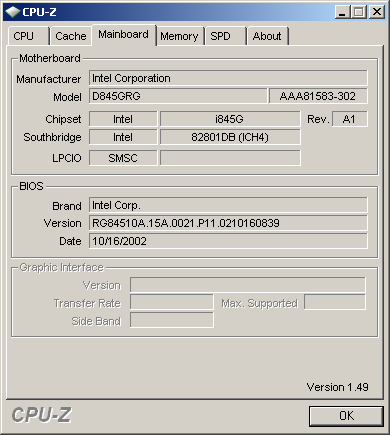 On asked for my mobo info. Hopefully this is what he was looking for.
+On !Uvm54ORbmo — 12.2 years ago, 4 minutes later, 1 day after the original post[T] [B] #407,249
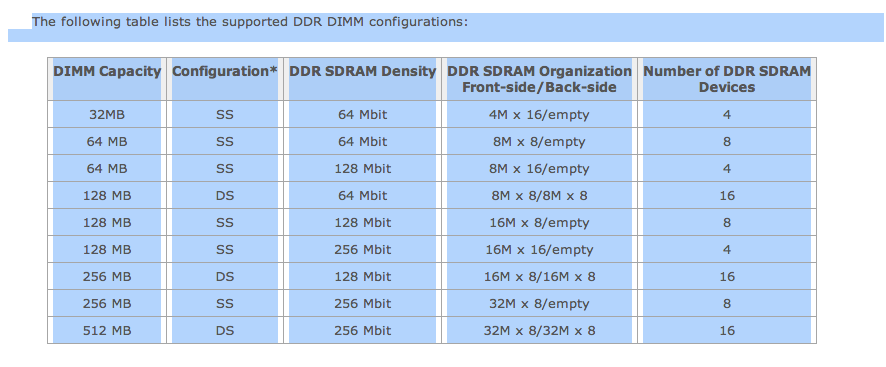 I found the user manual of your mobo and found this table interesting......
no mention of 1GB size ram......
·On !Uvm54ORbmo — 12.2 years ago, 1 minute later, 1 day after the original post[T] [B] #407,250
guess this is the reason:
System memory features
The Intel® desktop board D845GRG contains the following memory features:
Two DIMM sockets supporting 2.5V (only) 184-pin 200/266 MHz Double Data Rate (DDR) SDRAM DIMMs with gold-plated contacts
Unbuffered non-ECC DIMMs only
Maximum total system memory: 2 GB; minimum total system memory: 64 MB
Serial Presence Detect (SPD) DIMMs only
Suspend to RAM
Caution Do not use ECC DIMMs with the Intel Desktop Board D845GRG as they could damage the desktop board.
System memory features
The Intel® desktop board D845GRG contains the following memory features:
Two DIMM sockets supporting 2.5V (only) 184-pin 200/266 MHz Double Data Rate (DDR) SDRAM DIMMs with gold-plated contacts
Unbuffered non-ECC DIMMs only
Maximum total system memory: 2 GB; minimum total system memory: 64 MB
Serial Presence Detect (SPD) DIMMs only
Suspend to RAM
Caution Do not use ECC DIMMs with the Intel Desktop Board D845GRG as they could damage the desktop board.
Start a new topic to continue this conversation.
Or browse the latest topics.